I built and released Verto over three months, from October 2025 to January 2026.
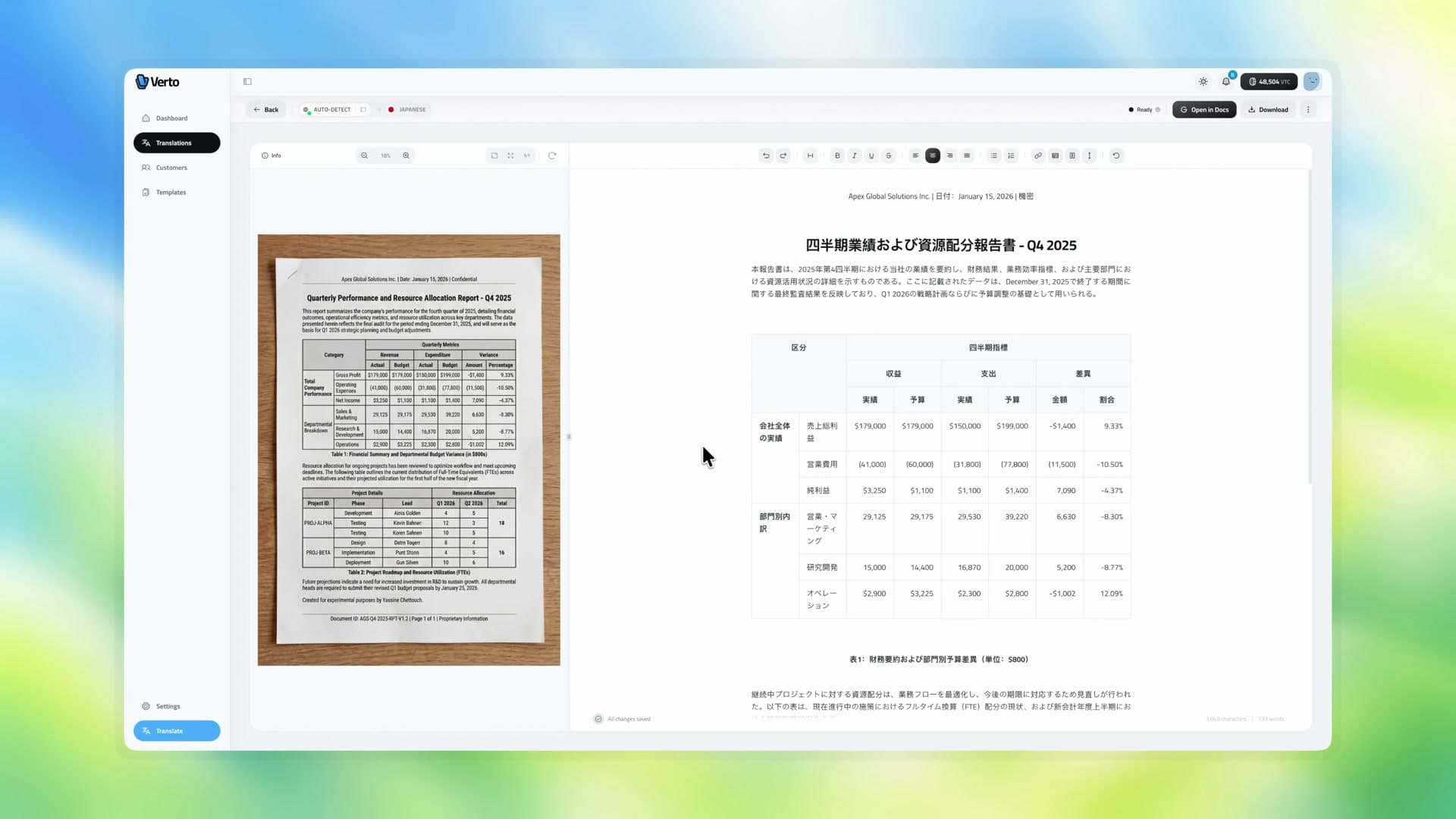
The film follows a financial report from photograph to reviewed Japanese translation and editable delivery. That document is one example of the wider agency workflow.
Build The Product Around The Agency
I built the account and administration interfaces alongside the document workspace. Customer records and translation history keep each job connected to the agency's client. Branding settings carry the agency's logo, stamp and certification text into the delivered document.
Stripe funds the credit balance used for processing. I implemented the transaction ledger, credit deductions and refunds, including the handling of failed processing jobs. Administration covers users and credit adjustments, with account security and data access enforced behind the interface.
Translation and generation run as background tasks with saved stages and failure details. Users can leave the page and return to the completed result for review and export.
Preserve Structure Through Review
The source stays beside the translated document while the translator works. They can compare figures, correct wording and merge or split table cells without leaving the review workspace.
I chose a structured document model for paragraphs, headings and table cells, including their row and column spans. The editor, checking pass and export generator work from that structure. A correction has a defined place in the document, and the export can recreate a table as editable cells.
Names follow an explicit preservation policy. In the Japanese example, the company and personal names stay in Latin script, letting the reviewer compare them directly with the source.
Check Against The Original
The pipeline produces a structured translation from the page images, then runs a separate checking pass against the original. That pass looks for issues such as missed content and table misalignment, storing its corrections and processing details for review.
The translator still reviews the result beside its source before delivery. The automated check and the editing workspace are two parts of the same review process.
Carry Context Across A Long Document
Processing a long report in batches creates a continuity problem: later sections need the names, terminology and structure established earlier. I pass those entities and term choices between batches, together with recent headings and a summary of the document so far.
For Arabic, reading direction also has to survive the handoff. The document model and export logic handle right-to-left text and table-cell order, carrying those decisions into the delivered file.
Generate A Native Google Doc
I built the Google Docs generator around the same document model used for review. It maps paragraphs, headings, tables, headers and footers into native Google Docs operations.
Merged cells made that mapping more involved. The generator reconstructs the full table grid, tracks row and column spans, then creates and merges the cells at their correct positions. Right-to-left tables also require the cell order to be handled explicitly.
The result is a document the translator can continue working in. The film closes by clicking into a real Google Docs table cell and using Tab to move between cells. The generation workflow also supports DOCX and PDF, with agency branding and certification text.
Verto is a personal project. The film uses synthetic agency records and existing completed translations; it demonstrates the workflow rather than live processing speed or customer adoption.
Related work: Student Applications & Document Collection applies document extraction to a guided customer workflow.

